Secure Computing SG550 Dokumentacja Strona 11: Device Status LEDs
 1
 2
 3
 4
 5
 6
 7
 8
 9
 10
 11
 12
 13
 14
 15
 16
 17
 18
 19
 20
 21
 22
 23
 24
 25
 26
 27
 28
 29
 30
 31
 32
 33
 34
 35
 36
 37
 38
 39
 40
 41
 42
 43
 44
 45
 46
 47
 48
 49
 50
 51
 52
 53
 54
 55
 56
 57
 58
 59
 60
 61
 62
 63
 64
Front Panel
�
11
Hardware Overview
Power Button
The power button is located on the left side of the front panel. You use the power
button to power the device on and off. When you power on the device, ScreenOS
starts as the power supply completes its startup sequence. See “Powering the
Device On and Off” on page 26 for more information.
Reset Config Button
The Reset Config button restarts the device. You press this button by inserting a
thin, firm wire (such as a straightened paper clip) into the pinhole on the front
panel. You can also restart the device using the CLI and WebUI interfaces. See
“Restarting the Device” on page 41 for more information.
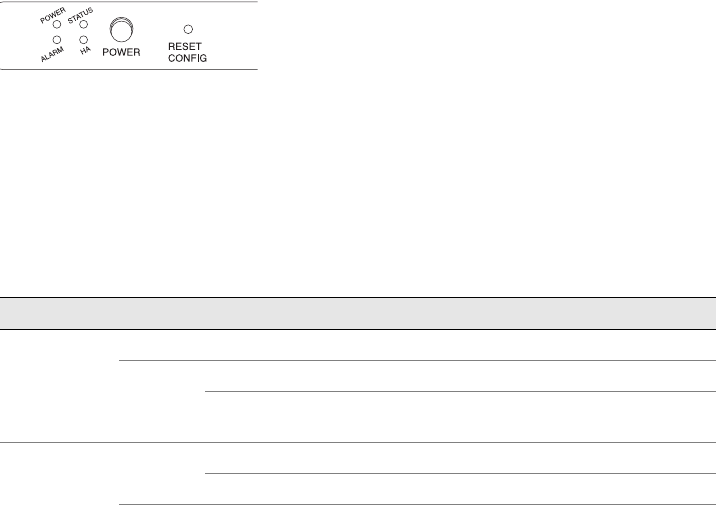
Device Status LEDs
The Device LEDs show information about current device status. Figure 2 illustrates
the position of each LED on the front of the SSG 500-series device.
Figure 2: Device Status LEDs
When the device powers up, the POWER LED changes from off to blinking green,
and the STATUS LED changes in the following sequence: red, green, blinking green.
Startup takes approximately two minutes to complete. If you want to turn the
device off and on again, we recommend you wait a few seconds between shutting it
down and powering it back up. Table 2 lists the name, color, status, and description
of each device status LED.
Table 2: Device Status LED Descriptions
Name
Color
Status
Description
POWER
Green
On steadily
Device is receiving power
Red
On steadily
Power Supply Unit (PSU) failure
Off
Device is operating normally or is not receiving
power
STATUS
Green
On steadily
Device is starting or performing diagnostics
Blinking
Device is operating normally
Red
Blinking
Error is detected
Plik PDF · ·
Pytania o Secure Computing SG550
Nie ma jeszcze pytań o tę instrukcję. Zadaj pierwsze.
Powiązane produkty i podręczniki dla Bramy / kontrolery Secure Computing SG550
- Bramy / kontrolery Secure Computing SG570 Instrukcja Użytkownika
 (23 strony)
- Bramy / kontrolery Secure Computing SG570 Instrukcja Użytkownika
(21 stron)
- Bramy / kontrolery Secure Computing SG570 Instrukcja Użytkownika
(341 stron)
- Bramy / kontrolery Secure Computing SG550 Instrukcja Użytkownika
(297 stron)